


Apple News | Bills On Your Table HD Arrives for the iPad
Bills On Your Table, a bill and expense tracking application for iPhone, is now available for the iPad.
Bills ~ On your table HD allows you to store and track various types of bills and expenses with a specific due date, usually repeating. You will not forget again -- when a bill or an expense is due, you are reminded to pay it. Thanks to the main overview screen, pre-alerts and notifications, you can always stay on top of your bills' due dates.
Use Bills ~ On your table HD on its own, or use it along with the iPhone version, so you can always track your bills no matter where you are and receive notifications where you prefer to. You don't need to care about syncing, all of your bills are synced live using your personal user account. Syncing is cloud based, free and automatic. User account(s) must be created in the app directly.
★ HIGHLIGHTS:
- Free cloud syncing included, no subscriptions
- Multi-device syncing support, you can use one user account on many iPads, iPhones and iPods at the same time (iPhone version sold separately)
- All 170 currencies and currency formats supported
- Tracking your bills, mark them as paid/unpaid
- Stats with total paid and total unpaid amounts
- Payment log with history of actions
- AutoPay support
- Partial payments
- Dynamic monthly bills support
- Passcode lock
- Dangling coins + another 8 push alert sounds to choose from
- Custom repeatings
- Custom pre-alerts
- Customizable categories
- Web access to your bills and expenses for added convenience
You can purchase Bills HD from the App Store for $4.99.
Read More


Bills ~ On your table HD allows you to store and track various types of bills and expenses with a specific due date, usually repeating. You will not forget again -- when a bill or an expense is due, you are reminded to pay it. Thanks to the main overview screen, pre-alerts and notifications, you can always stay on top of your bills' due dates.
Use Bills ~ On your table HD on its own, or use it along with the iPhone version, so you can always track your bills no matter where you are and receive notifications where you prefer to. You don't need to care about syncing, all of your bills are synced live using your personal user account. Syncing is cloud based, free and automatic. User account(s) must be created in the app directly.
★ HIGHLIGHTS:
- Free cloud syncing included, no subscriptions
- Multi-device syncing support, you can use one user account on many iPads, iPhones and iPods at the same time (iPhone version sold separately)
- All 170 currencies and currency formats supported
- Tracking your bills, mark them as paid/unpaid
- Stats with total paid and total unpaid amounts
- Payment log with history of actions
- AutoPay support
- Partial payments
- Dynamic monthly bills support
- Passcode lock
- Dangling coins + another 8 push alert sounds to choose from
- Custom repeatings
- Custom pre-alerts
- Customizable categories
- Web access to your bills and expenses for added convenience
You can purchase Bills HD from the App Store for $4.99.
Read More


Apple News | Two New Ports Found on Latest iPad 2 Cases
| Tuesday, 18th January 2011, 02:01 am | ||
The latest iPad 2 cases to appear online have cutouts for two new ports, according to AppleInsider and M.I.C Gadget. "We got a look on the new iPad 2 case, and surprisingly, it features two new holes, one in the upper left (when viewed from the front) and the another in the upper-middle", says M.I.C Gadget. However, unlike the previous "alibaba" cases, the newest case design to surface shows a very distinct cutout on the rear upper left corner (a blank area on the current iPad) that appears to be consistent with the size of an SD Card slot. The new case also depicts a cutout on the center of the top edge that appears to be the size of a mini DisplayPort jack, located between the camera hole and the headphone port, reports AppleInsider. Engadget recently reported that the iPad 2 would feature an SD card slot giving some credence to these reports. [AppleInsider] [M.I.C Gadget] [via MacRumors]  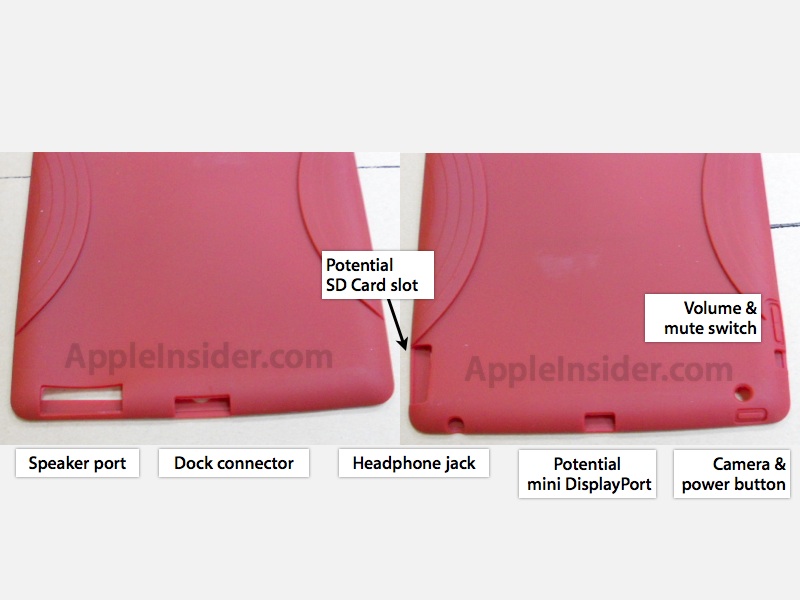 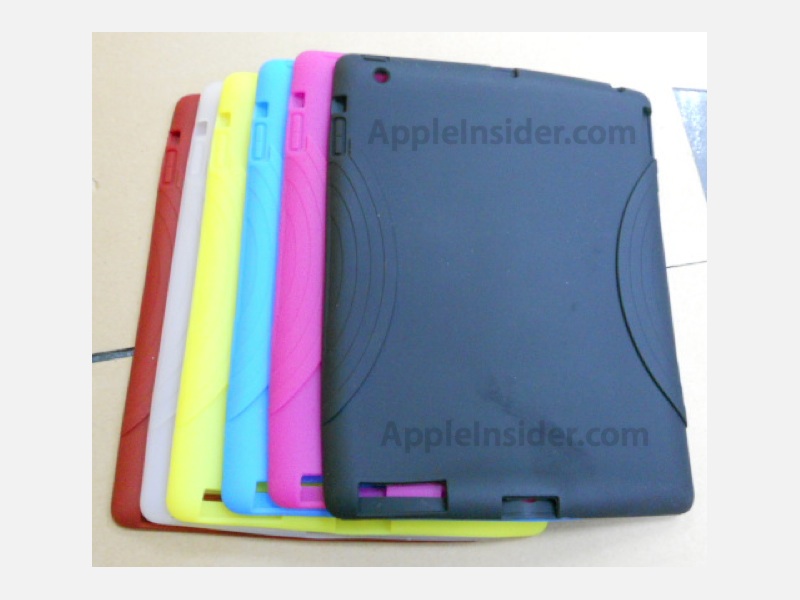 | ||
Apple Asks Federal Government to Stop iPhone Jailbreaking
Apple has approached the federal government to help stop hackers from jailbreaking the iPhone, reports NBC.
A spokesperson from Apple told the US Copyright Office that "Current jailbreak technologies now in widespread use utilize unauthorized modifications to the copyrighted bootloader and operating system, resulting in the infringement of the copyrights in those programs".
This action of Apple has come after Sony recently filed a lawsuit against the well known iPhone hacker Geohot for jailbreaking PlayStation 3.
It is also to be noted here that in July last year, the United States government ruled in the favor of iPhone jailbreaks and unlocks as legal, as long as they were not used for piracy purposes. Full details of this new DMCA legislation can be read here.
Steve Jobs Takes Medical Leave of Absence from Apple
Apple CEO is going on a "medical leave of absence”. In his absence, Apple COO Tim Cook will take over company’s day-to-day operations. Steve Jobs though will remain as the CEO of the company.

Here is the full email which Jobs sent to all Apple employees this morning:
Team,
At my request, the board of directors has granted me a medical leave of absence so I can focus on my health. I will continue as CEO and be involved in major strategic decisions for the company.
I have asked Tim Cook to be responsible for all of Apple’s day to day operations. I have great confidence that Tim and the rest of the executive management team will do a terrific job executing the exciting plans we have in place for 2011.
I love Apple so much and hope to be back as soon as I can. In the meantime, my family and I would deeply appreciate respect for our privacy.
iPhone 5 and iPad 2 to Feature Dual Core GPU – Report
January 17th, 2011
According to a report by AppleInsider, the next-gen iPhone and iPad will sport a dual-core SGX543 GPU from Imagination Technologies.

With the recent rumors of 2048×1536 high resolution display for the iPad 2, and references of drivers for SGX543 GPU in iOS 4.3 Beta SDK, this shouldn’t be all that surprising.
Apple’s next generation iPad and iphone both due the first half of this year, will pack a new version of the company’s custom A4 chip, with dual, faster graphics cores capable of supporting a Retina Display iPad and potentially bringing 1080p HD support to iOS devices, including Apple TV.
iPhone 5 and iPad 2 to Feature Dual Core GPU – Report
January 17th, 2011
According to a report by AppleInsider, the next-gen iPhone and iPad will sport a dual-core SGX543 GPU from Imagination Technologies.
With the recent rumors of 2048×1536 high resolution display for the iPad 2, and references of drivers for SGX543 GPU in iOS 4.3 Beta SDK, this shouldn’t be all that surprising.
With the recent rumors of 2048×1536 high resolution display for the iPad 2, and references of drivers for SGX543 GPU in iOS 4.3 Beta SDK, this shouldn’t be all that surprising.
Apple’s next generation iPad and iphone both due the first half of this year, will pack a new version of the company’s custom A4 chip, with dual, faster graphics cores capable of supporting a Retina Display iPad and potentially bringing 1080p HD support to iOS devices, including Apple TV.
Published with Blogger-droid v1.6.7
Jailbreak iPhone Now...!!!
Item(s): JAILBREAK AND UNLOCK IPHONE
Package includes: Unlock, Jailbreak, and Activate Your
iPhone 4, 3GS ,3G,2G, All versions
2.2.1, 3.0, 3.0.1, 3.1, 3.1.2, 3.1.3, 4.0, 4.0.1, 4.0.2, 4.1, 4.2.1 &
JailBreak iPod Touch All Version.
Unlock All iPhones: 4GB, 8GB, 16GB and 32GB and make it work with all SimCards Network providers
Price: RM30 - RM90
Dealing method: AREA USJ OR TAIPAN
Location of seller: USJ 6
Contact method/details: 0193033600/0142444133
GET FREE GAMES, FREE WALLPAPERS, FREE APPLICATIONS, FREE LOCKSCREEN, FREE
VIDEO WALLPAPERS, EVERYTHING FREE!
The time to Jailbreak will be around 30-45 mins, because once i Jailbreak your
phone, i will be installing apps for you, 3d video wallpapers, themes and also
free games.
WHAT IS JAILBREAK?
Once jailbroken, iPhone users are able to download extensions and themes that
are unavailable through the App Store (via installers such as Cydia) and
perform other tasks that are not possible on store-bought devices.
Apple iPad vs Samsung Galaxy Tab (iPad for Kids?) – Head to Head Comparison
When we talk about touchscreen-only Tablets, the first device that pops up in mind is the iPad. It is an awesome device in many ways, provided that you find some good use for it. When iPad waslaunched earlier this year, it was pushed as a device to innovate the way we use our computers, just like what iPhone did with smartphones back in 2007.
The popularity and success of iPad naturally spawned many different manufacturers to bring similar devices to market. There was the JooJoo, the now dead HP Slate, Dell Streak and tons of other Android based devices. But none of them could proved to be a serious challenge to Apple’s offering. Samsung recently announced the Galaxy Tab, an Android 2.2 tablet which is getting lots of attention in media for being the only tablet that can give iPad a serious a run for its money.

Below is a quick showdown between the two touchscreen-only tablets, showing how the more popular iPad stands against the yet to be released Galaxy Tab.


Galaxy Tab’s specs above sure looks impressive, but can this 7-inch device be even qualified as a touchscreen-only Tablet? To me, the fact that you can easily hold it in one hand, make phone calls with it, and take picture on the go makes it more of a one big ass smartphone than a Tablet of iPad class, which should probably be competing with the Droid X, HD2 or the EVO 4G and not the iPad. Yes, the front-facing camera for video conferencing makes sense, and this is probably something Apple should have included with v1 of iPad but then again, iPad is slated for a hardware revisionearly next year and is very likely to get iPhone 4 like FaceTime video calling feature. The rear camera on the other hand seems completely pointless to me because I don’t think people would like to take photos with a 7″ digital camera.
Coming to the user experience, which is extremely important for a Tablet device of this kind. iOS for iPad is optimized for larger, more spacious screen of iPad. If you have ever used an iPad you would know what exactly I am talking about here. Android 2.2 in its current iteration isn’t ready for large screen devices yet. It is primarily a phone OS which has been forced to do a Tablet job, just like those Windows 7 Tablets with custom UI shells on top. And so to hide Android’s deficiencies, Samsung has come up with a large screen version of TouchWiz custom UI which is also found on their Galaxy phones. This new version of Samsung’s TouchWiz UI (for Tab and Galaxy S) in my opinion is an iOS knock-off, and it has this “iPad/iPhone for Kids” look and feel to it which makes the device look more like a toy for kids, than a serious gadget.
Multitasking on Galaxy Tab shouldn’t be a big deal because by the time you get Tab in your hands, iPad will have all the multitasking goodness as part of iOS 4.2 release in November.
Last but not the least, the sheer number of quality iPad only apps in the App Store compared to the unmonitored crappy mess in Android Market for different Android based devices, the higher price point of Tab (rumored to be between $800 to $1000) compared to iPad etc. only makes iPad a much better value for money than any of the competing devices out there.
Let us know what do you guys think about this. Would you chose an Android Tablet over iPad? and if so, why?
Spoof Your Carrier Name on iOS 4.2.1 With Fake Operator [Jailbreak Tweak]
With a new tweak available in Cydia called Fake Operator, you can now rename your operator / carrier and put it as whatever you desire. Similar to the MakeitMine application that was released after the first-ever jailbreak, but with this new tweak you can do so without a dedicated app, oh and it is fully support on the latest iOS 4.2.1 firmware.

The app will not add an icon to the home screen, but options can be configured from the iPhone Settings app. MakeitMine in comparison had the extra option of changing what is displayed on the banner and is also available for free.


You will, of course, need to have a jailbroken iPhone or iPod touch to install it. Follow our step by step guide posted here to jailbreak your iPhone, iPad or iPod touch with Redsn0w on iOS 4.2.1, or with Limera1n on iOS 4.1 if you haven’t already.
Fake Operator is available now from Cydia under the BigBoss repository for free.
Langgan:
Catatan (Atom)

